Mobile Phishing Awareness Insights: Expert Guide and Professional Recommendations
Phones get tricked just like computers - scams sneak in through texts, social apps, email, chat tools, or knockoff programs. Tiny displays make dodgy links tough to spot, letting fakes pass as real without much effort. When alerts pop up out of nowhere, knowing what hides behind them changes how people react. Fake logins, urgent warnings, mystery attachments - seeing patterns helps block trouble before it spreads. Clarity comes from practice, not luck, spotting odd spelling, wrong addresses, sudden requests. The more someone notices red flags early, the less harm reaches their data or contacts. Surfaces matter less when habits protect better, especially tapping blindly into unknowns.
This guide walks through what mobile phishing is, how attacks usually happen, clues that something might be off, plus everyday actions helping you stay safer on phones.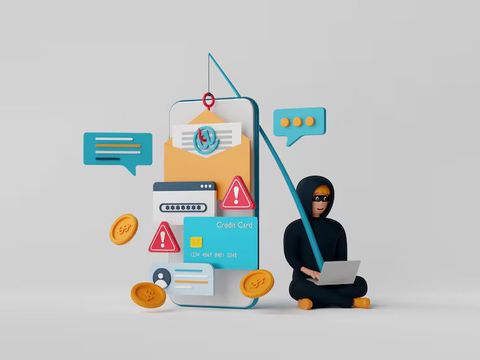
Mobile Phishing Awareness Explained
Out of nowhere, scammers aim at people using phones and tablets by sending tricky messages. They often pretend to be banks, well-known services, shipping helpers, or someone you know. With these tricks, they hope you will tap on dangerous web addresses, bring in infected documents, or hand over private details. Only moments after a message arrives might it seem safe - usually it isn’t.
On phones, scams slip through because eyes move fast. Jumping between apps means less attention lands on warning signs. A tap happens before a thought does. Tiny screens hide tricks that big monitors show clear. Trust builds in seconds there. Misspelled words? Not seen. Odd sender names? Ignored. Quick thumbs override slow checks.
Common mobile phishing methods include:
- Text message scams go by another name too - smishing. These trick messages come through your phone like regular notes but carry hidden traps instead
- Fake mobile applications
- Fraudulent social media messages
- Messaging app scams
- QR code phishing
- Voice phishing through phone calls
These days, mobile accounts mean more to hackers because people bank on phones now. When someone loses control of their device, private details might slip out - especially if care is low. Smartphones hold money data, names, dates, and secrets. Thieves watch for chances when attention fades. Protection slips, problems follow. Little mistakes open big doors.
Common Types of Mobile Phishing Attacks
Out of nowhere, mobile phishing shifts when new ways to chat appear. Scammers often push emotions - urgency, dread, wonder, even promises - to rush people into moves they regret later.
Below is a table showing common mobile phishing methods and their typical warning signs:
Messages out of nowhere might hide traps. A sudden text pushes quick answers, links that feel off, numbers you do not know. Inbox alerts on phones bring clumsy wording, names pretending to be real people, files attached without reason. Strange apps ask for too much access, acting like they belong. Codes scanned from posters send users sideways into strange web spaces. Someone calling directly may rush a response, wanting passwords or details. Private notes through social networks come from faces never seen before, asking to log in again.
Most people still fall for SMS scams since texts seem urgent, like they’re meant just for you. Because someone might panic over a fake shipping notice or login alert, they tap shady links without checking where it leads.
Not far off the radar: dodgy apps are popping up more often. These copies pretend to be finance helpers, ways to pay bills, or work organizers. After slipping onto a device, they start grabbing passcodes, watching what you do online, even pushing you toward fake sign-in spots.
Out of nowhere, someone might call pretending they work at your bank. Not always obvious, these callers could claim ties to official agencies too. Pressure builds fast during such conversations - sudden threats appear if you wait. Information slips out before people realize what just happened.
Mobile Users Often Targeted
One spot holds tons of private details when it comes to phones. Think contact names sitting beside login codes, money apps tucked next to snapshots, messages woven through everything else. Thieves notice that pile-up fast - little wonder these gadgets draw attention like sparks.
Several factors increase mobile phishing risks:
- Smaller screens can hide suspicious web addresses
- Notifications encourage quick responses
- Public Wi-Fi networks may increase exposure to attacks
- Mobile users often reuse passwords across apps
- Automatic logins may provide easier account access
- App permissions can expose sensitive data
Surprising how often fake messages ride on brand recognition. A note that looks like it's from your courier might actually hide something else entirely. Streaming services? Payment apps? They’re common masks too. Peek closer and things shift. Tiny links on phones blur the truth. Space crunches on small screens help deception thrive.
On the move, eyes skim screens fast. Because of this, odd phrasing might slip by unnoticed. People tap replies during commutes or between tasks. Odd sender names? Often ignored. When choices happen in seconds, warnings lose their edge.
Spotting mobile phishing clues
Starts with spotting actions often tied to phishing tricks. Even if scams look different, most carry familiar red flags. A close eye might catch odd links slipping into emails. Messages pushing urgency tend to raise suspicion fast. Strange greetings sometimes signal something off. Mismatched names or titles can hint at trouble too. Requests for passwords arrive when real organizations wouldn’t ask. Poor grammar slips through more fake notes than expected. Unexpected attachments appear without clear reason. Fake websites mimic real ones but feel slightly wrong. Spotting patterns helps before harm spreads. Tone feels off? That gut feeling matters. Odd timing adds up across suspicious cases.
Some common indicators include:
- Requests for passwords or verification codes
- Messages creating panic or urgency
- Unexpected account suspension warnings
- Suspicious links or shortened URLs
- Poor spelling or unusual formatting
- Unfamiliar phone numbers or email addresses
- Requests to install unknown applications
Most fake messages copy real companies almost perfectly. Look at the logo, colors, or wording - it might seem right at first glance. Yet something slightly off could mean trouble ahead. A mismatched detail sometimes shows it was never honest to begin with.
A fake email could send someone to a site where the address looks almost right but swaps one character. Instead of letters, it might slip in numbers that resemble them closely. Unusual endings appear too - little twists meant to confuse. Small phone displays make spotting such details harder than expected.
Surprisingly, odd requests often signal trouble ahead. Think twice when someone claims to represent a known company yet wants sensitive details out of the blue. Messages asking for passwords usually come from imposters, not real services. Phone calls demanding PINs? Genuine groups almost never do that. Watch how the request arrives - urgency is a red flag. Real support avoids collecting verification codes by text. Quiet moments reveal patterns others miss. Legitimate companies respect boundaries around personal data. Unexpected prompts deserve second thoughts. Trust tends to vanish when pressure appears.
Safe Ways to Use Your Phone Without Taking Chances
Start smart by spotting sketchy messages fast. Staying alert helps dodge sneaky scams hiding in plain sight. Good habits act like locks on a door, slowing down troublemakers. Watch closely what you tap - mistakes open doors. Small steps build strong shields over time.
Some useful mobile safety habits include:
- Keeping mobile operating systems updated
- Downloading apps only from trusted app stores
- Reviewing app permissions carefully
- Using strong and unique passwords
- Enabling multi-factor authentication
- Avoiding suspicious public Wi-Fi connections
- Verifying unexpected messages independently
When you log in, needing more than just a password makes breaking in much harder. A stolen username and secret word alone won’t open the door easily.
Clicking on links inside strange messages? Better skip that. Go straight to the website yourself by typing it out or using your app. That way you check things without risk.
Most of the time, fresh software patches show up to fix holes hackers could sneak through. When updates roll in, they usually bring fixes for problems people just found. Left untouched, older versions tend to stay open to attacks everyone already knows about.
Most phones hold more private details than they need. When one gets into the wrong hands, less saved info means less risk. Cutting down what stays on your phone helps stay safer. Fewer records tucked inside mean hackers find less to use.
Public Awareness and Digital Education
Most people learn how to avoid phishing through public schools. When phones get smarter, so do scams targeting them. Because of training at work, workers spot suspicious messages faster. Learning materials make it easier to tell what's safe online.
Staying sharp with tech matters more these days, no matter how old you are. Teens might run into trouble on apps where they chat or play games online. Older folks could get tricked by fake emails asking for money or pretending to help fix computers. One size does not fit all when it comes to learning what's safe. Each crowd needs guidance that fits their habits.
Still, companies help fight mobile phishing by sending warnings, setting up login checks, yet relying only on tech won’t wipe out scams. Spotting odd behavior depends heavily on how alert people are. Even smart systems need sharp users watching closely.
Out there, schools are starting to talk about cyber risks during regular tech chats. Think: locking down passwords so strangers cannot sneak in. Work spots join in too, showing folks how settings keep data private. Community workshops pop up, often zeroing in on fake emails that trick people. One thing leads to another - better habits slowly take shape. Spotting scams becomes easier when examples flash across screens. People begin asking questions they never thought mattered. Digital spaces feel less like wild zones, more like places with rules. Knowledge slips in quietly, through stories and slip-ups alike.
Conclusion
Smartphones hold lots of private details today - making it crucial to recognize mobile scams. These tricks usually create panic, mimic trusted contacts, or exploit momentary lapses in attention. A quick tap might open doors better kept shut.
Most scams start with a fake message that feels urgent. Watch for odd spelling or strange sender addresses instead of ignoring them. A request out of the blue often hides something else behind it. Updating your phone regularly keeps some attacks from getting through. When links seem off, wait before tapping them. Trusted apps still need permission checks once in a while. Surprise pop-ups tend to lead nowhere good. Security works better when small steps add up quietly.
One step forward in tech often means sneaky tricks get sharper too. Staying alert, learning what to watch for, spotting odd messages - these quietly help keep phones secure. Not every click is safe, but habits can shift the odds.